Connecting Freeview and SKY to the same satellite dish
To connect both a Freeview box or recorder for Satellite and a SKY decoder to one satellite dish you need to use a single power pass splitter and connect the power pass side to the SKY decoder as shown below.
The LNB stands for the Low Noise Blocker on your satellite dish.
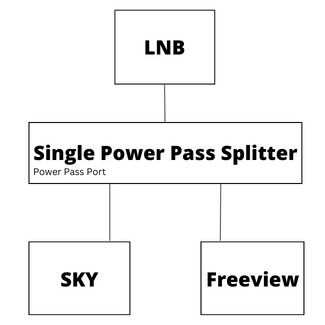
Please note: with this set up, you'll need to keep your SKY decoder plugged in for the Freeview Satellite box or recorder to work, as the SKY decoder will be powering the LNB (which controls the sound). If you were to remove the SKY decoder, also remove the single power pass splitter and connect the cable from the satellite dish directly to your Freeview box or recorder.
Other FAQs
Our Guide to TV Antennas
Guide to Tuning
How do I setup Freeview?
Can I use both a UHF aerial and a Satellite dish?
What if I move house?
What is a Freeview Box or Set top box?
Can I get Freeview on all the TVs in my house?
Setup widescreen pictures on Satellite or recorder box
Digital Device Clock and Daylight Savings Time
What to Do When Your Device Indicates an Upgrade is Available
Where can I get a replacement remote?
Satellite dish alignment and LNB adjustment
Dual tuner TV